
Chatter
Applies To: Essentials ✅ | Growth ✅ | Pro ✅
Overview
Chatter is Salesforce’s built-in collaboration tool that enables users to post updates, share files, tag colleagues, and comment directly on CRM records. It supports real-time collaboration across teams and ensures communication stays tied to context — whether it’s an Account, Opportunity, or Contact.
Chatter requires no configuration in the Sales Hub Accelerator and is available by default on all major objects and record pages.
Core Use Cases
@Mentions for Quick Collaboration
Tag teammates directly on a record to ask questions, provide updates, or request feedback.
Status Updates
Leave short notes on recent developments (e.g. "Client verbally confirmed Q4 renewal").
File Sharing
Upload documents, presentations, or images to the record so others can easily find and download them.
Comments & Threads
Reply to colleague updates to maintain threaded conversations tied to a deal or customer.
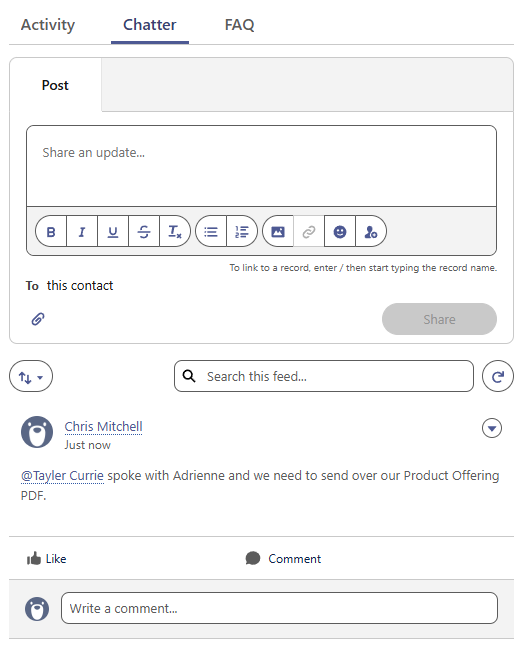
Chatter ensures your CRM becomes a living history of collaboration — reducing email clutter and surfacing insights where they matter most.
How to Access Chatter
Record Pages
Chatter is visible as a tab on most major objects (Accounts, Opportunities, Contacts, Leads).
Best Practices
Use @Mentions to alert team members, managers, or technical specialists.
Keep updates short and action-oriented.
Use Chatter instead of emails for internal record-related discussions.
Avoid posting sensitive client data — Chatter is for internal use only.
Summary
Chatter keeps your teams aligned and your CRM conversations visible. By using it to share updates, files, and feedback directly on records, Sales Hub users can streamline collaboration, reduce missed communication, and ensure everyone stays in the loop — all without leaving the platform.
Version: 1.0.0
Updated: 16 May 2025