
Leads
Applies To: Essentials ✅ | Growth ✅ | Pro ✅
Overview
The Lead object is the entry point for capturing and qualifying sales prospects. Accelify’s Sales Hub Accelerator enhances this object with visual indicators, stakeholder profiling, qualification logic, and scoring that helps sales teams focus on high-priority leads and standardise conversion processes.
Used By: SDRs, BDMs, Account Executives
Key Purpose: Capture → Qualify → Convert

Leads convert into Accounts, Contacts and Opportunities making them a great tool to quickly create 3 records!
Guided Walkthrough
https://www.loom.com/share/83a1dd80a478419f90c729e4109c7090Lead Page Highlights
The Lead Record Page in the Sales Hub Accelerator has been designed to surface key information and qualification signals at a glance. Below are some of the key features our Sales Hub Lead page contains.
Lead Highlight Panel
This panel provides a real-time summary of critical lead attributes using visually scannable icons.
It includes:
Lead Persona: Combines the selected Role and Seniority Level to display a stakeholder type (e.g. “Decision Maker – Director”) with an associated emoji.
Rating Temperature: Derived from the Rating field, showing 🔥 Hot, ☀️ Warm, or ❄️ Cold.
Communication Preference Indicator: Automatically displays an icon based on the lead’s preferred contact method (Email, Phone, LinkedIn, etc.) and alerts for opt-outs.
Lead Data Completeness: Shows a coloured icon and percentage (✅ Complete / 🟡 Partial / 🔴 Incomplete) based on how many key data points are populated.

This panel helps sales users immediately prioritise leads, interpret engagement method, and assess qualification quality — even before opening related tabs or scrolling.
Contact Profiling
These sections consolidate communication and role-based information into one simple block.
Contact Details: Captures how to reach the lead, including email, mobile, and LinkedIn profile. The LinkedIn field provides quick access for social profiling and outreach alignment.
Contact Profiling: Shows the lead’s stakeholder role and seniority level. These values drive the Lead Persona shown in the highlight panel and help sales teams target decision-makers and key influencers appropriately.
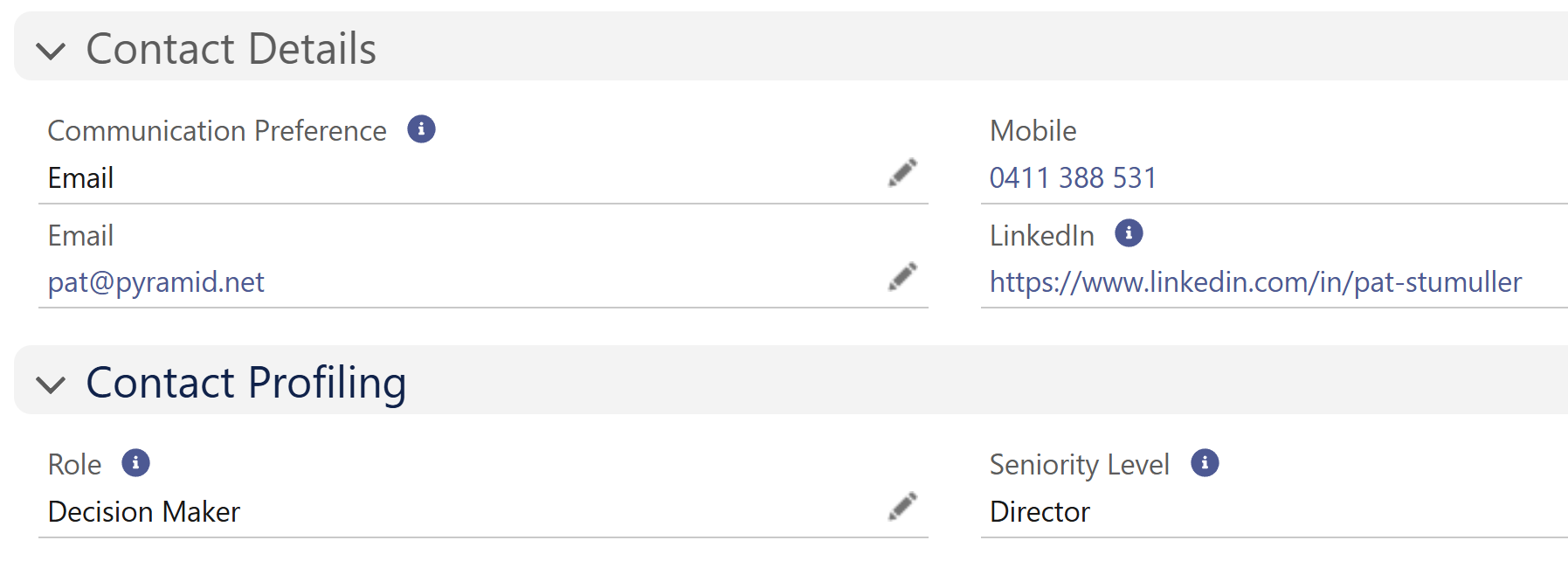
This structured view ensures every user sees the most relevant contact data first, reducing lookup time and supporting more personalised, context-aware engagement.
Pre-Sale Qualification
This section captures the foundational BANT-style information used to assess whether a lead is ready to convert.
Problem Identified: Indicates whether the lead has expressed a known business challenge or pain point.
Budget Confirmed: Flags if budget is approved or likely, based on rep confirmation.
Buying Readiness: Captures expected decision-making timeline (e.g. “3–6 Months”).
Buying Stage: Helps evaluate where in the buying journey they are.
Description: An open text field for reps to log additional colour around the lead's motivation, urgency, or next steps.
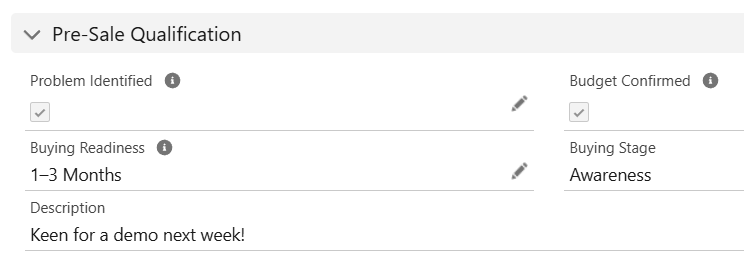
Together, these fields contribute to the Lead Qualification Score and allow reps and managers to quickly identify engaged leads who are ready for sales follow-up or conversion.
Data Rules (Validation Rules)
The Sales Hub includes critical validation rules to support clean data entry, compliance, and downstream automation readiness.
Validation Rule | Purpose |
|---|---|
Contact Details Mandatory | Prevents saving a Lead without at least a Email OR Phone OR LinkedIn. |
Do Not Call – Clear Mobile | Prevents saving if ‘Do Not Call’ is checked but a mobile number remains populated. |
Do Not Email – Clear Email | Prevents saving if ‘Email Opt Out’ is checked but the Email field still contains a value. |
Lead Source Required | Ensures the Lead Source field is always completed, which supports accurate attribution, ROI, and conversion reporting. |
These rules enforce hygiene standards from the outset and align with reporting and automation dependencies across the Sales Hub.
List Views
The Sales Hub comes with 10 ready-to-use List Views that help sales teams segment, prioritise, and take action on leads quickly. Each list view includes key filters and highlights to surface high-value or at-risk records at a glance.
List View Name | Purpose |
|---|---|
All - High Potential Leads | All leads marked with hot temperature and complete data |
All - Leads Needing Cleanup | Leads missing key fields or scoring low on data completeness |
All - Leads Stuck in Working | Leads in ‘Working’ status for >14 days without updates |
All - New This Week | Recently created leads to support timely follow-up |
All - Open Leads | All leads that are not yet converted or disqualified |
My - High Potential Leads | User-assigned leads with hot temperature and ready-to-convert signals |
My - Leads Needing Cleanup | Assigned leads flagged for missing contact, profiling or qualification info |
My - Leads Stuck in Working | Personal working leads that have stalled for action |
My - New Leads This Week | Recently assigned leads for this user, created this week |
My - Open Leads | All active leads currently assigned to the user |
Each view is designed to streamline outreach, prioritisation, and coaching workflows for reps and managers alike.
Accelify Sales Hub Field Glossary
The following table outlines all custom and surfaced standard fields used within the Lead object for the Sales Hub Accelerator. This serves as a reference for admins, support staff, and documentation users to understand field intent and purpose.
Field | Type | Description |
|---|---|---|
Lead Data Completeness | Formula (Text) | Displays visual % complete indicator (✅, 🟡, 🔴) |
Budget Confirmed | Checkbox | Indicates whether budget is verified |
Buying Readiness | Picklist | Decision timeline (e.g. “Ready Now”, “3–6 Months”) |
Problem Identified | Checkbox | Whether the lead has identified a business problem |
Rating Temperature | Formula (Text) | Icon based on native Rating field |
Lead Persona | Formula (Text) | Icon + label based on Role & Seniority |
Communication Preference | Picklist | Preferred contact method (Phone, Email, SMS, LinkedIn) |
URL | Link to prospect's LinkedIn profile | |
Role | Picklist | Contact role (e.g. Decision Maker, Influencer, Champion) |
Seniority Level | Picklist | Strategic weight of the stakeholder (Manager, Executive, etc.) |
Lead Age (Days) | Formula (Number) | Time since creation, used to surface stale or ignored leads |
Buying Stage | Picklist | Indicates the stage of the buying journey to support qualification and sales alignment |
Department | Text | Indicates the department the lead belongs to within their organisation |
Name | Compound | Full name including salutation, first name, and last name |
Company | Text | Company associated with the lead |
Title | Text | Job title of the lead |
Website | URL | Company website |
Email address | ||
Mobile | Phone | Mobile number |
Lead Source | Picklist | How the lead was acquired (e.g. Phone Inquiry) |
Industry | Picklist | Industry of the company |
Number of Employees | Number | Company size |
Rating | Picklist | Lead score (e.g. Hot, Warm, Cold) |
Address | Compound | Lead address |
Do Not Call | Checkbox | Suppresses phone contact |
Email Opt Out | Checkbox | Suppresses email contact |
Lead Status | Picklist | Status of the lead (e.g. New, Qualified, Converted) |
Lead Owner | Lookup(User) | Assigned user |
Created By | Lookup(User) | Creator of the record |
Created Date | Datetime | When the lead was created |
Last Modified By | Lookup(User) | Last updater |
Last Modified Date | Datetime | Last update time |
See the Data Dictionary for the full API Guide
Summary
The Lead object in the Sales Hub Accelerator is designed for speed, clarity, and qualification accuracy. It empowers sales teams to quickly capture inbound or outbound prospects, assess readiness, and prioritise follow-up using visual cues and structured data. With persona profiling, qualification scoring, and data completeness indicators built in, the Lead record becomes more than a static intake form, it’s an actionable, conversion-ready launchpad.
Version: 1.0.0
Updated: 16 May 2025