
Opportunities
Applies To: Essentials ✅ | Growth ✅ | Pro ✅

Overview
The Opportunity object in the Sales Hub Accelerator is designed to capture and guide every revenue-generating conversation, from discovery to close. Enhanced with visual indicators, qualification scoring, and risk profiling, it helps teams focus on high-priority deals, respond quickly to blockers, and maintain accurate forecasts.
Used By: BDMs, Account Executives, Sales Managers
Primary Purpose: Track deal lifecycle, assess qualification strength, expose risk, and drive predictable pipeline performance.
Guided Walkthrough
https://www.loom.com/share/cfec5bc300324c48aa202d3f30118f8fOpportunity Page Highlights
The Opportunity Record Page surfaces deal health, completeness, and qualification signals in a clear and actionable format.
Highlight Panel
At the top of each Opportunity is a high-impact panel displaying five core indicators:
Relationship Strength Indicator – Emoji-based trust rating based on contact engagement
Deal Velocity Indicator – Flags opportunities with no recent stage progression
Deal Risk Indicator – Alerts reps to missing budget, decision maker, or deal blockers
Discount Level Indicator – Shows discount impact (e.g. No Discount, Moderate, High)
Opportunity Data Completeness – Visual score: ✅ Complete, 🟡 Partial, 🔴 Incomplete

This summary allows instant assessment of whether a deal is qualified, in motion, and at risk, without having to scroll or open related lists.
Needs Analysis
This section captures the real-world business drivers behind the opportunity. Reps use this to document the challenges the customer is facing and the outcomes they’re trying to achieve.
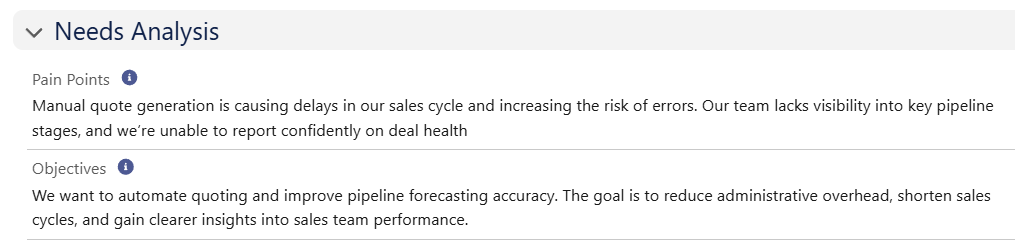
This information enables solution alignment, supports ROI framing, and improves messaging during late-stage negotiations.
Opportunity Assessment
This section validates deal strength and identifies qualification gaps. Fields such as Budget Confirmed, Decision Maker Involved, and Deal Blocker help teams assess risk early.
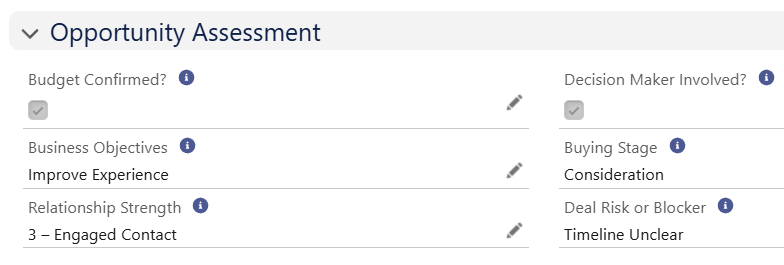
These values directly power the Deal Risk Indicator and contribute to accurate forecasting, prioritisation, and deal coaching.
Closed Reason Profiling
Capturing structured Closed Won/Lost information helps your business refine sales strategies, address common objections, and build smarter win/loss reports.

Reps are prompted to provide a clear Closed Reason and contextual Closed Notes for every deal, enabling pattern recognition and QBR-ready insights.
Opportunity Contact Roles
Linking decision makers, champions, and influencers helps clarify deal dynamics, unlock persona-based insights, and allows us to see personal relationship strength with everyone involved.
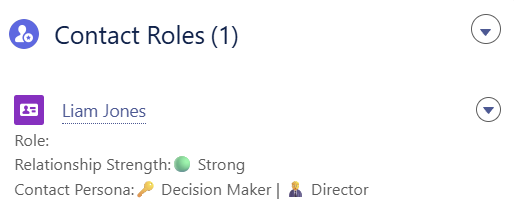
Contact Roles directly power visual engagement indicators and ensure every deal has stakeholder coverage for stronger forecasting accuracy.
Data Rules (Validation Rules)
The following rules ensure pipeline accuracy and prevent poor data quality:
Validation Rule | Purpose |
|---|---|
Require Amount for Closed Won | Ensures that Opportunities marked as Closed Won have a non-zero Amount, maintaining accurate revenue reporting. |
Close Date Must Be Today or Future | Prevents setting a Close Date in the past, ensuring that forecasting remains current and accurate. |
Close Date Must Be Today for Closing Deals | Ensures that Opportunities being closed have a Close Date of today, maintaining consistency in deal closure timing. |
List Views
The Sales Hub includes 16 curated list views for Opportunity management:
List View Name | Purpose |
|---|---|
All - Opportunities | Complete deal database |
All - Pipeline | Active open deals |
All - Closing This Month | Forecasted closes within current month |
All - Closing Next Month | Forecasted closes in upcoming month |
All - Closed | All won or lost opportunities |
All - At Risk | Deals with flagged blockers or missing qualifications |
All - Opportunities Needing Cleanup | Missing key fields like budget, decision maker, or objectives |
All - Deals Needing Attention | Deals lacking stage progress, next steps, or engagement |
My - Opportunities | User-owned deals |
My - Pipeline | User’s open pipeline |
My - Closing This Month | Deals closing for the user this month |
My - Closing Next Month | Forecasted deals for next month |
My - Closed | User’s won/lost history |
My - At Risk | Risk-flagged deals assigned to current user |
My - Opportunities Needing Cleanup | Incomplete deals for cleanup |
My - Deals Needing Attention | User-owned deals requiring progress or clarity |
Accelify Sales Hub Field Glossary
The following table outlines all surfaced fields on the Opportunity layout. It includes both Accelify custom fields and standard Salesforce fields.
Field Label | Type | Description |
|---|---|---|
Opportunity Name | Text | Deal title |
Account Name | Lookup(Account) | Linked customer record |
Stage | Picklist | Current sales process stage |
Close Date | Date | Target closing date |
Probability (%) | Percent | Forecast win confidence |
Amount | Currency | Quoted deal value |
Total Discount | Currency | Discount applied across products |
Opportunity Type | Picklist | Deal classification (New, Renewal, Upgrade) |
Description | Long Text | General deal context or sales notes |
Pain Points | Long Text | Key customer challenges |
Objectives | Long Text | Stated business outcomes |
Budget Confirmed? | Checkbox | Indicates if budget is locked or secured |
Decision Maker Involved? | Checkbox | Whether a key stakeholder is actively involved |
Buying Stage | Picklist | Awareness / Consideration / Ready to Buy |
Deal Risk or Blocker | Picklist | Flags issues like unclear timelines or internal blockers |
Business Objectives | Text Area | Customer outcomes linked to business case |
Relationship Strength | Picklist (1–3 scale) | Engagement confidence from 1 (Low) to 3 (Strong) |
Customer Potential | Picklist | Tiered forecast indicator (Growth, Strategic, One-Off) |
Account Industry | Picklist | Industry of the linked Account |
Company Size | Picklist / Text | Estimated business size (Small, Mid, Enterprise) |
Next Step | Text Area | Next action plan or meeting follow-up |
Closed Reason | Picklist | Categorised reason for closure |
Closed Notes | Long Text | Additional explanation behind Closed Reason |
Lead Source | Picklist | Where the opportunity originated |
Primary Campaign Source | Lookup(Campaign) | Linked marketing campaign |
Opportunity Data Completeness | Formula (Text) | Visual percentage-based score for qualification fields |
Deal Risk Indicator | Formula (Text) | Emoji-based risk status (🚨 / 🟡 / ✅) |
Deal Velocity Indicator | Formula (Text) | Flags stalled deals with no stage movement |
Discount Level Indicator | Formula (Text) | Visual display of whether discounting is material |
Relationship Strength Indicator | Formula (Text) | Icon representing the level of stakeholder engagement |
Summary
The Opportunity object in the Sales Hub Accelerator equips sales teams to manage deals with focus, insight, and structure. From scoring qualification to identifying risk, it ensures sales conversations are rooted in the right data and that leadership can forecast with confidence. Whether managing expansions, renewals, or new business, this record supports a consistent, scalable, and insight-rich sales experience.
Version: 1.0.0
Updated: 16 May 2025