
Release Notes - V1.0.0
Release Notes - Version 1.0.0
Release Date: 12 May 2025
Package Name: Accelify Sales Hub
Package Version: 1.0.0
Namespace Prefix: accelify_sa__
Package Type: Managed (1GP)
Compatibility: Enterprise, Unlimited, Pro Suite
Minimum Salesforce Version: 54.0 (Spring '25)
Dependencies: Salesforce Sales Cloud licensing
We're excited to announce the release of the Accelify Sales Hub v1.0.0! This first release transforms standard Salesforce into an intuitive, adoption-focused platform designed specifically for growing businesses. The Sales Accelerator emphasises simplicity, visibility, and guided selling to help teams get up and running quickly with a CRM that drives real business outcomes.
Your Salesforce Journey with the Accelify Sales Hub
Starting Point | Install | 30 Days | 90 Days |
|---|---|---|---|
New to Salesforce | Rapid build with best-practice config | Enabled user adoption and data quality | Strategic expansion via Elevate |
Stalled Implementation | Relaunch with optimised UX | Renewed user engagement | Shift focus to outcomes |
Existing Salesforce | Seamless enhancement | Incremental metric improvements | Deepened business process support |
Why Accelify's Approach is Different
Purpose-built for SMBs: Designed around how growing teams actually sell, not enterprise complexity
Adoption-first: Prioritises user experience and real-world workflows
Value in weeks, not months: Setup completed within 10 business days
Data intelligence, not just data entry: Visual indicators and actionable insights
Continuous evolution: Integrated with the Elevate subscription to provide ongoing support, enhancements, enablement, and strategic advisory.
Core Features
Visual Data Health Framework
Completeness Indicators: Colour-coded signals across all key objects
Percentage-Based Scoring: Formula-driven field scoring
Actionable Insights: Instant visibility into missing or low-quality data
Quality Dashboards: Track data health at record, user, and team levels
Relationship Intelligence
Relationship Strength: Rating and icon display for engagement level
Contact Persona Identification: Role + seniority logic
Communication Preference Tracking: Preferred channel field and indicator
Engagement Visualisation: Score-based indicators to assess stakeholder quality
Deal Management Enhancements
Deal Risk Identification: Visual flags based on age, size, and stage
Velocity Tracking: Formula fields identify stuck deals
Qualification Indicators: Budget, authority, need, timing fields
Win/Loss Insights: Closed reason tracking fields
Enhanced User Experience
Simplified Layouts: Focused on top priority data points
Modern Design: Clean, intuitive interfaces optimised for clarity and speed
Guided Paths: Visual process guidance for Leads and Opportunities
Prebuilt List Views: Curated views for uncontacted leads, stale opportunities, and missing decision makers
Comprehensive Reporting & Dashboards
Role-Based Dashboards: Preconfigured for Sales Reps, Managers, and Admins
Data Completeness Insights: Track CRM data health across accounts, contacts, and opportunities
Adoption Analytics: Monitor logins, object usage, and user engagement trends
Pipeline & Forecast Visibility: Visualise risk, velocity, and win/loss insights
Component Details
Objects and Fields
The Sales Hub strategically enhances standard Salesforce objects with custom fields that drive visual indicators, enable scoring, and support intelligent workflows.
Object | Custom Fields | Field Categories |
|---|---|---|
Account | 20 |
|
Contact | 22 |
|
Lead | 18 |
|
Opportunity | 25 |
|
Activity | 6 |
|
*(Number) relates to approximately how many fields per category
Lightning Pages
Account Page: Strategic indicators, completeness, relationship visual
Contact Page: Persona, communication, related activity
Lead Page: Qualification stage, health, visual lead score
Opportunity Page: Velocity tracker, decision maker flags, guided path
Activity Pages: Call sentiment, meeting types, assigned priority
Dashboards and Reports
Sales Reps: Personal pipeline, activities, lead conversion
Sales Managers: Team performance, risk patterns, coaching cues
Adoption: Login trends, object usage, top performers
Data Quality: Field fill rates, completeness scores, stale data
Security Model
The Accelify Sales Hub provides your organisation with a secure, scalable Salesforce environment built on industry best practices. Your security model is:
Simple to understand
Easy to manage
Built to grow with your team
Access Levels: Who Can See and Do What
Your Salesforce access model is based on three core user roles.
Role | Can View | Can Create/Edit | Can Delete | System Access |
|---|---|---|---|---|
Sales Representatives | Their own records, shared customer data | Customers, opportunities, activities | No | No |
Sales Managers | Team records, reporting dashboards | Full access to sales and report data | Yes | Limited |
System Administrators | All Salesforce data and settings | Full access to records and configuration | Yes | Full setup and admin access |
How Record Access Works
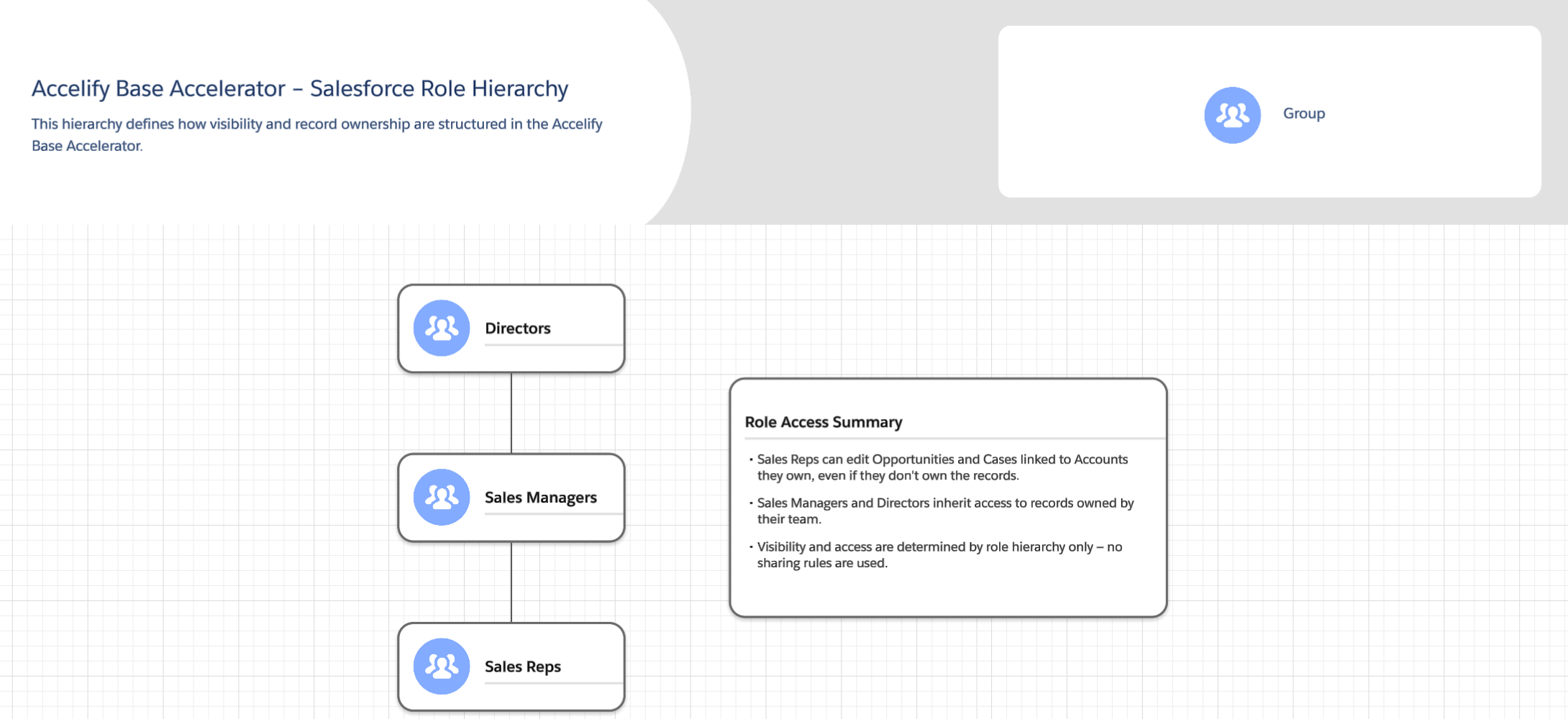
Your Salesforce environment mirrors your team structure using role-based visibility.
Directors can view and manage all CRM data
Managers can view and manage their own and their team’s records
Sales representatives focus on their own customers
Admins have complete system oversight
Data Visibility by Record Type
Each type of record has its own visibility rules based on collaboration and confidentiality.
Data Type | Who Can See It | Why It Is Configured This Way |
|---|---|---|
Accounts | All users | Supports cross-team customer collaboration |
Contacts | Inherits from Account | Ensures visibility aligns with account access |
Opportunities | Record owner and their manager | Protects deal privacy and ownership integrity |
Leads | Record owner and their manager | Prevents cross-team lead interference |
Products | All users (Read Only) | Allows everyone to reference the product catalogue |
Contracts | Managers and Admins | Protects sensitive commercial terms and agreements |
Orders | Follows Opportunity or Account access | Ensures continuity across quote-to-cash workflow |
Activities | Follows related record access | Enables team collaboration and visibility into customer engagement |