
Lead - What Happens When You Convert a Lead in Salesforce?

Converting A Lead
Converting a Lead in Salesforce transforms a qualified lead into three connected records — Account, Contact, and Opportunity — in one action.
When you click Convert on a Lead, Salesforce:
Creates or matches an Account based on the Company field
Creates or matches a Contact from the Lead’s name and email
Creates a new Opportunity (optional depending on setup) linked to that Account and Contact
In Accelify’s Sales Hub, this process is streamlined and enriched by qualification data, ensuring your pipeline is built on clean, validated inputs.
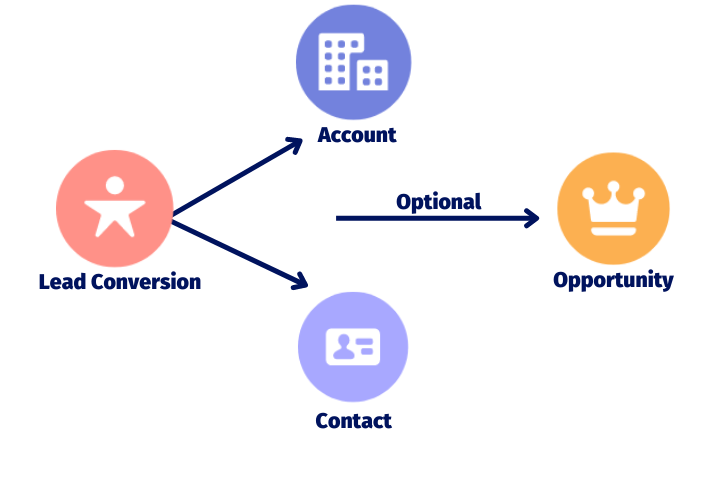
1 Record can quickly turn into 3 Records!
Why It's Best Practice to Create a Lead First
Creating a Lead helps your team capture early interest without cluttering your main CRM with unqualified records. It separates exploratory conversations from committed sales pipeline.
Using Leads allows you to:
Prequalify interest before creating Accounts or Contacts
Score and prioritise leads based on readiness
Track source, engagement history, and qualification steps
Enforce consistency in sales process and conversion timing
Why It’s Faster Than Manually Creating Records
Without using Leads, a rep would need to create three separate records — Account, Contact, and Opportunity — and manually connect them. This process:
Slows down sales activity
Increases risk of duplicate or incomplete records
Results in inconsistencies and lost data
With Lead Conversion:
All three records are created or matched in one action
Opportunities inherit key qualification data from the Lead
Data completeness and visual indicators carry over for use in reports and dashboards